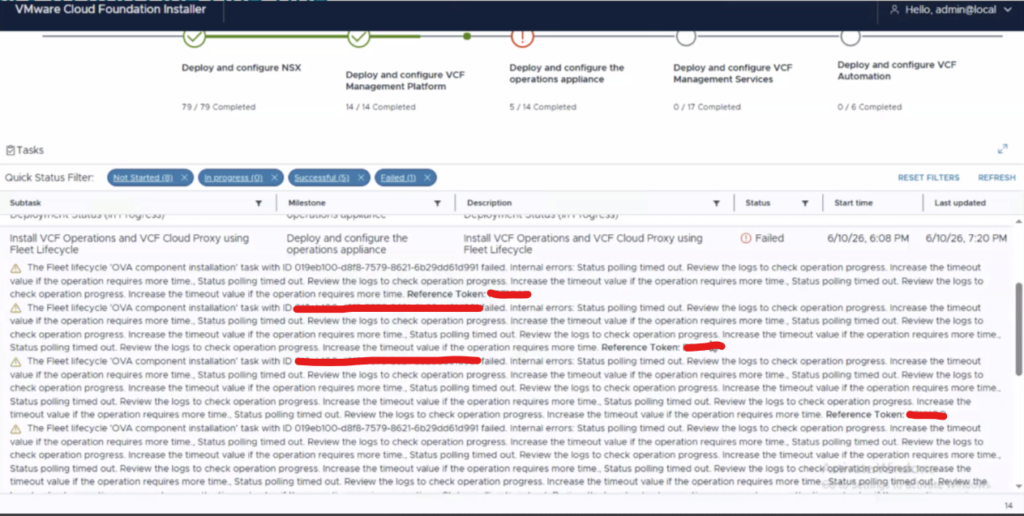
Step 5 Deploy and configure the operations appliance
The error “The Fleet lifecycle ‘OVA component installation’ task with ID failed. Internal errors: Status polling timed out. Review the logs to check operation progress. Increase the timeout value if the operation requires more time., Status polling timed out. Review the logs to check operation progress. Increase the timeout value if the operation requires more time., Status polling timed out. Review the logs to check operation progress. Increase the timeout value if the operation requires more time., Status polling timed out. Review the logs to check operation progress. Increase the timeout value if the operation requires more time., Status polling timed out. Review the logs to check operation progress. Increase the timeout value if the operation requires more time., Status polling timed out. Review the logs to check operation progress. Increase the timeout value if the operation requires more time., Status polling timed out. Review the logs to check operation progress. Increase the timeout value if the operation requires more time., Status polling timed out. Review the logs to check operation progress. Increase the timeout value if the operation requires more time., Status polling timed out. Review the logs to check operation progress. Increase the timeout value if the operation requires more time., Status polling timed out. Review the logs to check operation progress. Increase the timeout value if the operation requires more time., Status polling timed out. Review the logs to check operation progress. Increase the timeout value if the operation requires more time. Reference Token”
The Fix:
After extensive troubleshooting, indicators pointed to an NTP-related issue, based on both VMware documentation and findings from previous support case.
VCF Operations was online and accessible; however, no NTP configuration was present within VCF Operations. (Basically blank configuration!) During troubleshooting, the customer primarily validated connectivity to only one of the two configured NTP servers. It was subsequently identified that the second NTP server was unreachable due to firewall restrictions.
It is important to note that both NTP servers must remain available throughout the VCF 9.1 deployment process. Although the environment initially passed the prerequisite validation checks, either the availability of the second NTP server changed after the checks were completed, or the original health checks did not sufficiently validate all configured NTP sources i’m not sure.
Once the NTP availability issue was identified and resolved, the deployment was able to proceed as expected. As part of the remediation process, the existing VCF Operations virtual machine was removed\renamed, and the installer workflow was resumed. This resulted in the deployment of a new VCF Operations OVA, which completed successfully once connectivity to all configured NTP servers was restored and verified.
Reminder of the correct firewall rules for DNS & NTP:


KB’s used during toubleshooting:
VCF 9.1 installer fails at “VCF Management Services Deployment Task” due to unreachable NTP server
Leave a Reply